1. PLATFORM DESCRIPTION
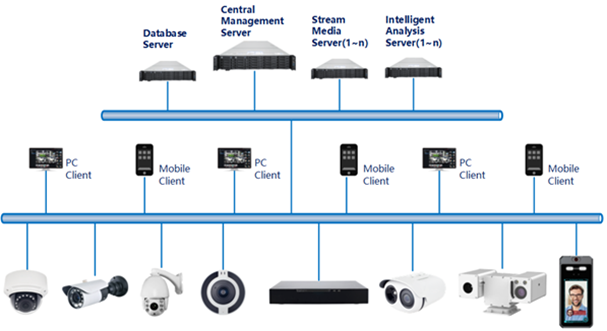
The WEG WCAM Manager is a video management solution designed to meet different monitoring scales. The platform offers:
- Centralized Management: Complete control of all devices from a single location.
- Distributed Deployment: Flexibility to organize and monitor devices in different locations.
- Multi-user Remote Access: Enables multiple users to securely access the system simultaneously.
Key Features:
- User, device, and server management.
- Camera configuration and control, including real-time video and video playback.
- Alarm management and interactive maps.
- Data statistics and facial recognition.
- Management of personal files and recording history.
1.1. WEG WCAM Manager Features
WEG WCAM Manager offers several features that simplify device management and video monitoring. Below are the key functionalities:
- Multi-user Connections: Allows simultaneous connection of multiple clients.
- Device Compatibility: Supports IP cameras, NVRs, DVRs, facial capture cameras, among others.
- Centralized Management and Distributed Deployment:
- Unified management of resources such as users and devices.
- Distributed server deployment for greater flexibility.
- Access Management: Different users can receive specific permissions according to their profiles.
- Device Management:
- Supports automatic search, manual addition, and batch import of devices.
- User Management and Classification:
- Supports hierarchical organizational structures, allowing higher-level users to manage subordinates.
- Organizational Management: Restricts users within an organization to exclusively access cameras belonging to the same organization.
- Real-Time Monitoring:
- Supports multi-screen layout preview and full tour display.
- Video Playback: Supports synchronous playback of videos with multiple images.
- Video Download: Allows downloading of NVR and DVR recordings to local devices.
- Map Management: Video viewing based on electronic maps.
- Real-Time Alarms: Displays device alerts and alarms directly on the client interface.
- Data Statistics: Generates reports on alarms, device connectivity rates, and other relevant data.
- Facial Recognition:
- Face library for multi-level management and batch data import.
- Real-time comparison of captured faces with the face library.
- Image search to find similar faces within the face library.
- Event Linking: Automates actions like sending alarms, emails, triggering I/O of cameras and recorders when specific conditions are met.
1.2. System Components
| Acronym | Full Name | Description |
|---|---|---|
| CMU | Central Management Unit | The central management unit centralizes user management, authority management, and device management. |
| MDU | Media Distribution Unit | The media distribution unit forwards audio and video streams from the device to the requesting user. |
| IAU | Intelligent Analysis Unit | The intelligent analysis unit is used for facial recognition applications. |
1.2.1. CMU - Central Management Unit
The Central Management Unit (CMU) centralizes the management of users, devices, alarms, maps, face databases, and more. As a service, it can be installed exclusively on a server or together with other components. Users must first connect to the CMU to authenticate themselves. Subsequently, they can connect to the Media Distribution Unit (MDU) and Intelligent Analysis Unit (IAU) to use the relevant functionalities.
1.2.2. MDU - Media Distribution Unit
The Media Distribution Unit forwards audio and video streams from the device to the requesting user, ensuring high performance with low end-to-end latency. It supports running as a service and can be installed on a standalone server or together with other components.
When the MDU is installed separately on a server, the IP address of its CMU must be configured so that it can be managed by the CMU. The performance requirements for the Media Distribution Unit are as follows: Gigabit NIC (Network Interface Card).
Media Distribution Unit Performance Requirements:
| Channel | Camera Bitrate | Input Bitrate | Output Bitrate |
|---|---|---|---|
| 200 | 4 Mbps | 800 Mbps | 800 Mbps |
| 400 | 2 Mbps | 800 Mbps | 800 Mbps |
| 500 | 1.5 Mbps | 800 Mbps | 800 Mbps |
1.2.3. IAU - Intelligent Analysis Unit
The Intelligent Analysis Unit is used for facial recognition applications. It exclusively supports cameras with face detection functionality and operates as a service. The server can be installed on a dedicated server or shared with other components. For high-performance requirements, it is recommended to install the Intelligent Analysis Unit in a separate environment.
Recommended Requirements for the IAU
| Type | Processor | RAM Memory | Facial Detection Channels |
|---|---|---|---|
| CPU | Intel® Core i5-7500 | 8 GB | 1-3 |
| CPU | Intel® Core i7-8700 | 8 GB | 2-8 |
| CPU | Intel® Xeon E5-2630 v4 | 16 GB | 4-10 |
With the presented configuration, performance may vary under conditions of low camera access, despite high-quality real-time video and intense human flow. Requirements can be adjusted based on specific usage needs.
1.2.4. Database
The Central Management Unit (CMU) and the Intelligent Analysis Unit (IAU) utilize system configuration and information stored in a MySQL database.
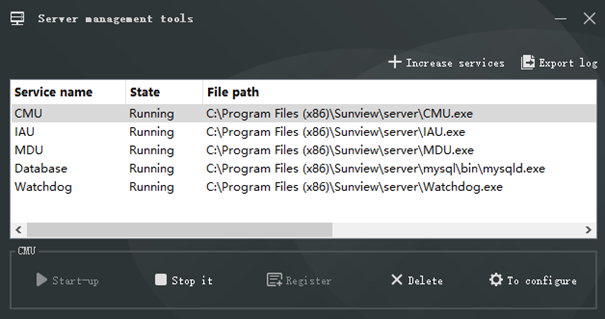
1.2.5. Server Management Tools
The server management tool is used to manage server services; it displays the running status of the service and can also control the startup, stop, and removal of the service. You can manually add the service. If the service component does not start normally, the system will display a reminder, allowing the problem to be detected in a timely manner. The tool launches automatically once the installation is complete, as shown in Figure 1-1:
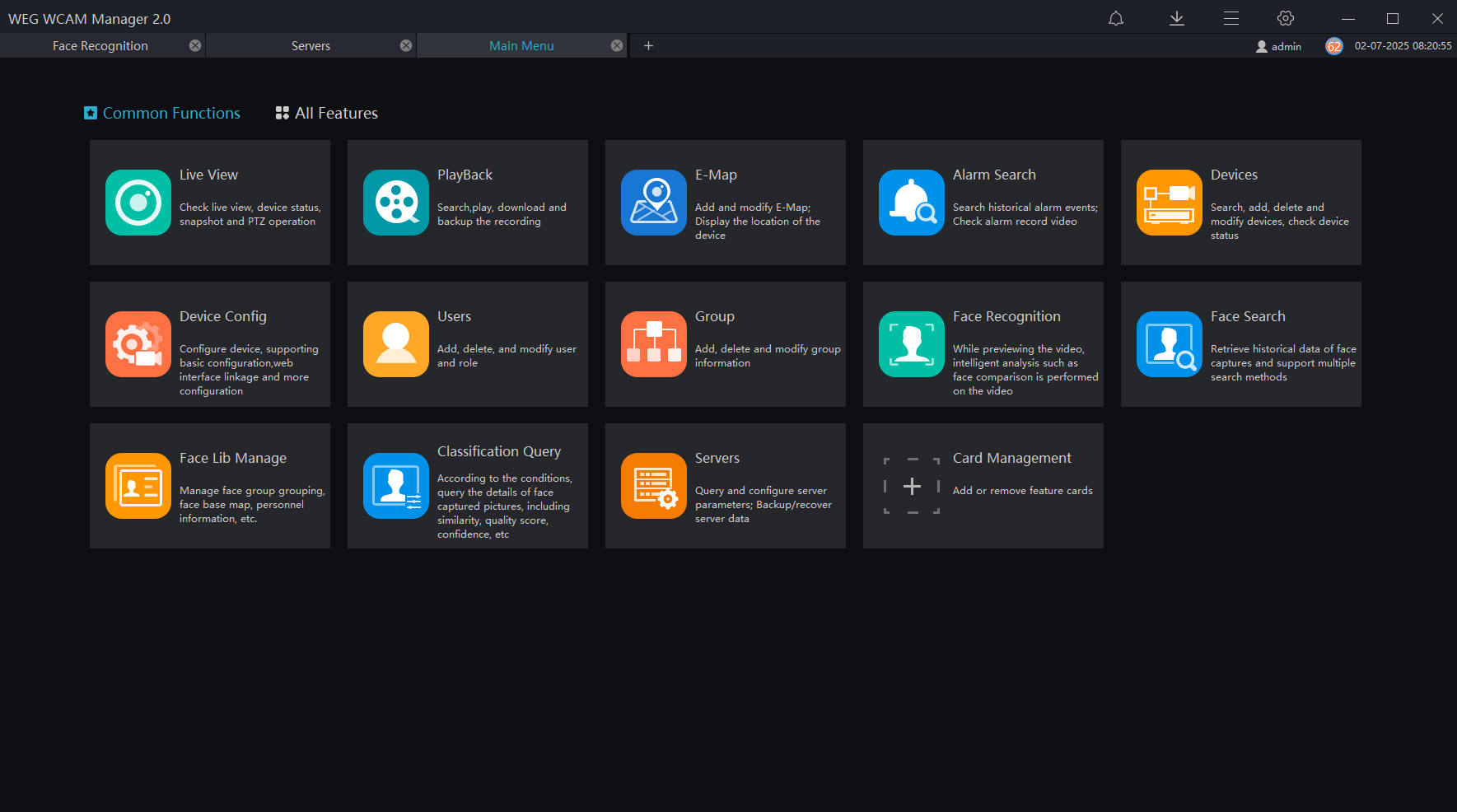
1.2.6. Desktop Client
Currently, the Desktop Client only supports the Windows operating system. It is a software specifically developed for video management. Users can remotely access real-time videos and video recordings, manage users, devices, servers, alarms, etc., and simultaneously control devices. The interface is shown in Figure 1-2.
After logging in, the system verifies the versions of the client and server. If they do not match, an alert message will appear:
"Client and server versions do not match". It is recommended to use the same versions for both components.
1.3. System Requirements
The table below presents a reference for defining the recommended requirements for the solution.
| Desktop Client | CMU | MDU | IAU | IAU (GPU) | |
|---|---|---|---|---|---|
| CPU | Intel® Core™ i5 -7500 ou superior | Intel® Core™ i5 -7500 ou superior | Intel® Core™ i5 -7500 ou superior | Intel® Core™ i7 ou superior | Intel® Core™ i7 ou superior |
| RAM | 8 GB ou mais | 8 GB ou mais | 8 GB ou mais | 8 GB ou mais | 8 GB ou mais |
| Network | 1 Gbps | 1 Gbps | 1 Gbps | 1 Gbps | 1 Gbps |
| Storage | 50 GB ou mais | 50 GB ou mais | 50 GB ou mais | 50 GB ou mais | 50 GB ou mais |
| Operational System | Microsoft® Windows® 7 Pro (64 bits) Microsoft® Windows® 10 Pro (64 bits) Microsoft® Windows® 10 Enterprise (64 bits) Microsoft® Windows® Server 2012 Microsoft® Windows® Server 2016 | Microsoft® Windows® 7 Pro (64 bits) Microsoft® Windows® 10 Pro (64 bits) Microsoft® Windows® 10 Enterprise (64 bits) Microsoft® Windows® Server 2012 Microsoft® Windows® Server 2016 | Microsoft® Windows® 7 Pro (64 bits) Microsoft® Windows® 10 Pro (64 bits) Microsoft® Windows® 10 Enterprise (64 bits) Microsoft® Windows® Server 2012 Microsoft® Windows® Server 2016 | Microsoft® Windows® 7 Pro (64 bits) Microsoft® Windows® 10 Pro (64 bits) Microsoft® Windows® 10 Enterprise (64 bits) Microsoft® Windows® Server 2012 Microsoft® Windows® Server 2016 | Microsoft® Windows® 7 Pro (64 bits) Microsoft® Windows® 10 Pro (64 bits) Microsoft® Windows® 10 Enterprise (64 bits) Microsoft® Windows® Server 2012 Microsoft® Windows® Server 2016 |
| Software | DirectX 11 ou superior | ||||
| Resolution | 1600×960 ou superior; padrão 1920x1080 | ||||
| GPU | NVIDIA GTX 1050 ou superior |
The software is not compatible with 32-bit architectures.
1.3.1. Ports and functions
The table below presents the ports used by the solution.
| Port | Protocol | Function |
|---|---|---|
| 3303 | TCP | MySQL Database |
| 8080 | TCP | CMU |
| 10024 | TCP | Watchdog service |
| 10086 | TCP | CMU service, client connection |
| 10100 | TCP | IAU service, client connection |
| 10200 | TCP | MDU service, client connection |
| 15680 | TCP | SSL registry port on CMU |
| 15681 | TCP | SSL registry port on MDU |
| 15682 | TCP | SSL registry port on IAU |
| 17886 | TCP | Device registration port on IAU |
| 17888 | TCP | Device registration port on CMU |
| 17988 | TCP | Device registration port on MDU |
| 20085 | TCP | Listening port for IAU |
| 20087 | TCP | Listening port for IAU |
| 61002 | TCP | Monitoring port for P2P device discovery protocol |
1.3.2. Firewall
For the solution to work properly, it is recommended to open the following ports on the firewall.
| Port | Protocol | Function |
|---|---|---|
| 3303 | TCP | MySQL Database |
| 10024 | TCP | Watchdog service |
| 10086 | TCP | CMU service, client connection |
| 10100 | TCP | IAU service, client connection |
| 10200 | TCP | MDU service, client connection |
1.4. Deployment Planning
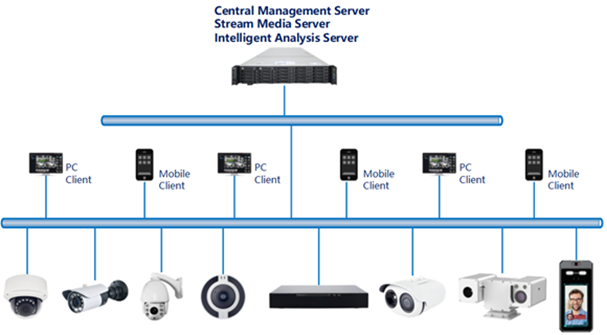
The platform has good scalability and can support three deployment methods:
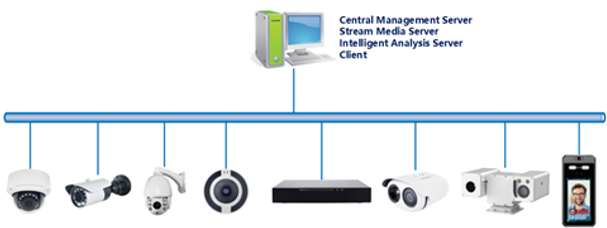
1.4.1 Standalone Deployment
All platform components, including server components and Desktop client components, are deployed on the same computer to facilitate the deployment of small-scale monitoring applications.
1.4.2 Client-Server Deployment (Small and Medium-Sized Businesses)
In this architecture, all services are installed on a single server, while the Desktop clients are distributed across operators' computers. This scenario is recommended for most applications, supporting a range of 50 to 500 video channels and some facial recognition channels.
1.4.3 Distributed Deployment (Large Enterprises)
The distributed architecture is recommended for managing a large number of video channels or when many facial recognition channels are required. In this scenario, each server component can be installed on a dedicated server, and multiple servers with MDU and IAU services can be deployed as needed for processing, making the solution scalable to support 500 to 10,000 video channels.